
By AISEN · Published: November 15 2026 · Last updated: November 15 2026
Your watch buzzes at 6:40 a.m. You slept seven hours and twelve minutes, it says, including an hour and twenty minutes of deep sleep. Yesterday you walked 9,412 steps, which is odd, because you spent a good chunk of the afternoon in a meeting waving your arms around.
Which of those numbers did the watch actually measure, and which did it make up? That’s the question behind how smartwatches track data, and the answer is stranger than you’d expect. A watch measures a handful of raw signals: movement, reflected light, tiny electrical signals, satellite positions and, depending on the model, skin temperature and air pressure. Everything else, from deep sleep to calories burned, is an estimate that software builds from those signals. Some estimates are remarkably useful. Others are closer to a rough sketch.
Table of Contents
How smartwatches track data: a handful of signals and a lot of guessing
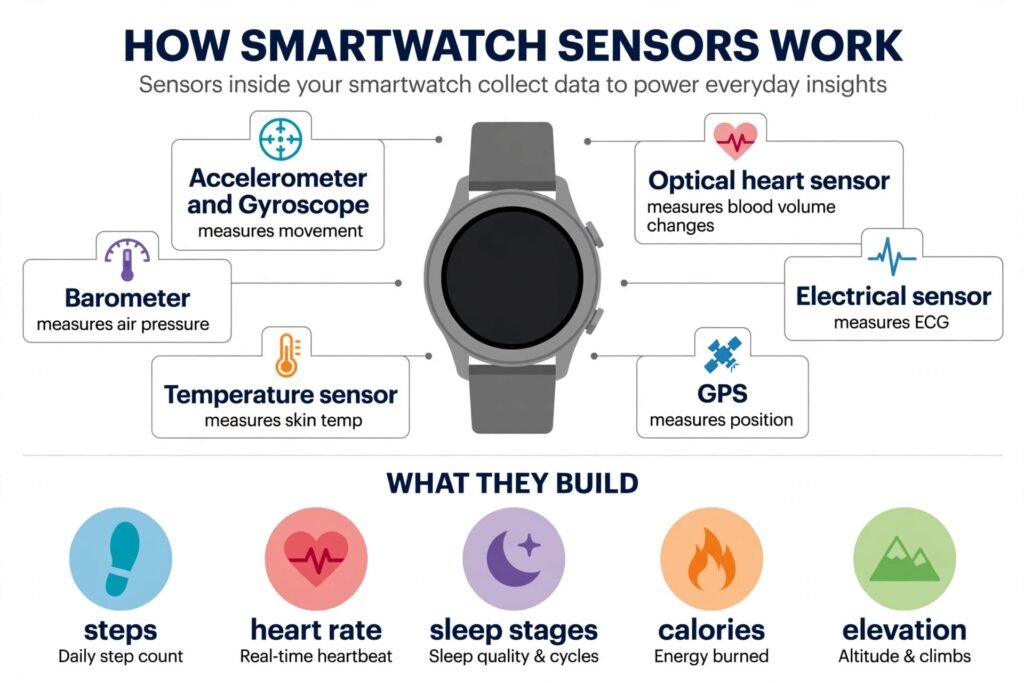
Almost everything your watch reports comes from a short list of sensors:
| Sensor | What it physically measures | What the watch estimates from it |
|---|---|---|
| Accelerometer | Acceleration and changes in movement across three axes | Steps, activity and movement patterns |
| Gyroscope | Rotation and angular movement | Wrist orientation and movement patterns |
| Optical sensor (PPG) | Changes in light absorption and reflection caused by blood-volume changes | Heart rate and pulse-rate variability |
| Red and infrared optical sensors | Differences in light absorption associated with blood oxygenation | Blood oxygen (SpO2) |
| Electrical heart sensor | Electrical signals detected through skin-contact electrodes | ECG recordings and certain irregular-rhythm checks |
| GPS/GNSS receiver | Signals from positioning satellites | Location, outdoor distance and route |
| Temperature sensor | Skin temperature | Changes in overnight skin temperature |
| Barometer | Atmospheric pressure | Changes in elevation and floors climbed |
Not every smartwatch contains all these sensors, and the hardware and features depend on the manufacturer and model. Sleep stages, stress and calorie expenditure also need algorithms that combine information from several sensors rather than relying on one measurement.
Look at what isn’t on that list: calories, stress, readiness and deep sleep. None of those is a sensor. They’re estimates that software builds on top of the signals. The rest of this post goes through them one at a time, roughly from the most trustworthy to the least.
Your wrist is a pendulum: how steps get counted
Walk normally and your arm swings like a pendulum, in a steady rhythm. An accelerometer, a tiny chip that measures acceleration in three directions, sees that rhythm as a series of repeating peaks. The watch’s software looks for peaks with the right spacing and strength, filters out the noise, and adds a step for each one.
That explains the failures. Push a shopping cart or a stroller and your wrist barely swings, so steps can be missed. Gesture a lot at your desk and a few big waves can be mistaken for steps. For distance indoors, the watch usually multiplies your steps by an estimate of your stride length, which comes from your height and how you walk, so the distance is one estimate stacked on another. Outdoors, GPS takes over, and some watches use it to calibrate your stride.
How accurate is it? Better than you might expect, with an important catch. A 2026 systematic review found that step-count error in modern trackers commonly falls below 5% during steady walking, compared with up to 25% in devices studied before 2017.
But controlled walking isn’t everyday life. Pushing a cart, carrying things, gesturing or walking slowly can all affect how well a wrist tracker recognizes steps. A 2024 umbrella review found that wearables generally tended to underestimate steps, though the errors varied across studies and devices. An earlier 2020 systematic review of free-living use found a different pattern: among 69 comparisons where the error could be calculated, 42% were within 10% of the reference count, 17% undercounted by more than 10%, and 41% overcounted by more than 10%, with a slight overall tendency to overestimate (a mean error of 5%).
The takeaway is that accuracy depends heavily on the device, the activity and how the test was run. As an illustration, if your watch reports 8,000 steps, an error of around 10% would be roughly 800 steps in either direction, and the real difference could be smaller or considerably larger. That’s why “about 8,000” is meaningful and “9,412 exactly” isn’t.
Light through your skin: how the heart rate sensor works
Here’s an experiment you can try in a dark room. Cover a phone’s flashlight with a fingertip. The finger glows red, and if you watch closely, the glow pulses very slightly with your heartbeat. Blood absorbs light, and there’s a little more blood under your skin each time your heart beats.
Your watch does a cleverer version of the same thing. On the back are LEDs and light detectors. Apple’s own explanation is that blood reflects red light and absorbs green light, so the watch flashes green LEDs at your skin hundreds of times per second and measures how much light bounces back. When your heart beats, more blood flows through your wrist, more green light is absorbed, and the returning signal dips. The technique has an ugly name, photoplethysmography, or PPG, and a simple idea behind it: count the pulses.
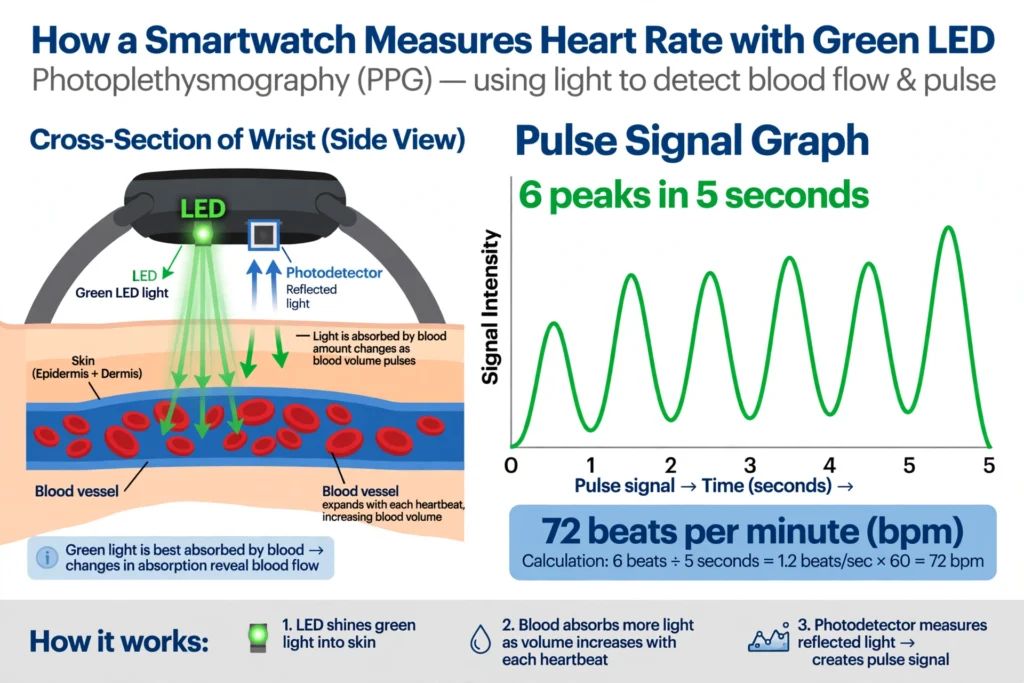
Watches change the color of light depending on the job. Apple says its watch uses green LEDs during workouts and for heart rate variability, and infrared light during sleep and for background readings and heart rate notifications.
The weakness is motion. Your wrist moving also changes how much light comes back, and the watch has to separate that from your pulse. It uses the accelerometer to guess which part of the signal is movement and subtract it, and that works well until the movement looks like a heartbeat. That can happen when you run, because your steps land at a rhythm close to a fast pulse, or when you grip a barbell.
The research reflects this. In a 2020 meta-analysis of wrist-worn heart rate devices, the average difference from a reference measure was tiny at rest (-0.01 bpm), during sleep (-0.40 bpm) and on treadmills (-0.51 bpm), but larger in cycling (-4.55 bpm) and resistance training (-7.26 bpm). The authors concluded the devices were acceptably valid for most common activities. Averages can hide big misses on individual readings. A 2025 study compared a Fitbit Charge 5 with a Polar H10 chest strap in 25 people and found an average resting error of 2.8 bpm. During exercise, the error grew with intensity for people with darker skin tones. Compared with light skin at low intensity, the study’s model estimated errors about 7.6 bpm higher for darker skin at moderate intensity and about 11.7 bpm higher at high intensity, and about 11.8 bpm higher for medium skin tones at high intensity. Those are adjusted differences from a statistical model, not the raw average error for each group. The study used one Fitbit model and a small sample, so it shouldn’t be applied automatically to every watch, but it shows why optical sensors can become less dependable under some conditions.
Two other things shift the numbers:
- Fit. A loose watch lets stray light in and the sensor bounce. Apple advises a snug but comfortable band, not too low on the wrist.
- Lag. The pulse at your wrist trails the electrical activity of your heart, so during sudden changes in effort the watch can be a beat behind.
For intervals, strength work or anything sprint-like, a chest strap is still the better tool. For resting heart rate, walking and steady runs, your wrist is fine.
ECG: when the watch stops using light
ECG is the one measurement on your watch that isn’t light. Some watches have electrodes on the back and on the crown or bezel. When you touch the crown with a finger on your other hand, you complete a circuit across your chest, and the watch records the tiny electrical signal of each heartbeat, for about 30 seconds.
That’s a single-lead ECG, a much simpler recording than the 12 leads a hospital uses. It can help identify certain rhythm abnormalities, such as possible atrial fibrillation, an irregular heart rhythm, but it can’t independently diagnose a heart attack. Certain smartwatch ECG and irregular-rhythm features have received regulatory clearance or authorization for specific purposes in particular markets. That applies to individual features on compatible devices, not to every health measurement a manufacturer offers, and it’s what sets these features apart from most of the others here.
Sleep: a motion sensor guessing what your brain is doing
Your watch doesn’t read your brain waves. Sleep labs do that, with a test called polysomnography. A watch uses your movement and your heart rate, sometimes with heart rate variability and skin temperature, and an algorithm sorts the night into wake, light, deep and REM sleep, typically in 30-second slices.
It gets two things right and two things wrong.
Right: telling sleep from wake. In a 2024 lab study of 35 adults comparing the Oura Ring, Fitbit Sense 2 and Apple Watch Series 8 with polysomnography, all three detected sleep with at least 95% sensitivity.
Wrong: noticing you’re awake. In a 2025 laboratory study of six wrist-worn devices, all detected more than 90% of sleep epochs, but their ability to identify when participants were actually awake was much weaker, with wake-detection specificity ranging from 29.39% to 52.15%. The watches were far better at recognizing sleep than at recognizing someone lying awake and still, which looks like sleep to a motion sensor. The study tested specific devices under lab conditions, so don’t treat its figures as universal.
Wrong: the stages. In the 2024 study, stage-by-stage sensitivity ranged from about 50% to 86%. The Apple Watch underestimated deep sleep by an average of 43 minutes and overestimated light sleep by 45, and the Fitbit overestimated light by 18 minutes and underestimated deep by 15. If your watch says you got an hour and twenty minutes of deep sleep, a miss of 43 minutes is more than half of that whole number. The Oura Ring was the closest to the lab in that study, and it was also the study’s funder, so read that result with some care.
So your total time asleep is a decent estimate. “One hour and twenty minutes of deep sleep” is a rough sketch, and last night matters less than whether your average is drifting over weeks.
Calories: a formula in a costume
Calories burned looks like a measurement, and it isn’t one. Your watch can’t see how much oxygen your body used. It estimates energy from your heart rate, your movement and the height, weight, age and sex you entered, and it applies a formula.
The problem becomes clear when researchers compare watch estimates with laboratory measurements. The 2024 umbrella review found that wearables tended to underestimate energy expenditure, with an average bias of about -3% and errors across studies ranging from about -21% to +15%. A 2026 systematic review found that even recent devices can show errors of roughly 10% to 40% against indirect calorimetry, the lab method that measures oxygen use, and that energy expenditure improved the least of all the metrics.
Those figures aren’t a correction factor for any particular watch. They show that calorie estimates can vary a lot by device, activity and person. So when your watch says 500 calories, treat that as an estimate, not a measurement. It’s more useful for comparing workouts than for deciding exactly how much you’ve earned at dinner.
Blood oxygen, temperature, HRV and the rest
Blood oxygen (SpO2). The watch shines red and infrared light into the skin and compares how much of each is absorbed, because oxygen-rich blood absorbs them differently. That ratio becomes a percentage. The 2024 umbrella review found mean absolute differences of up to 2.0 percentage points compared with reference devices. That can serve as a general wellness reference, but smartwatch oxygen readings aren’t a substitute for medical-grade assessment, and Apple says its Blood Oxygen measurements are intended for wellness purposes, not medical use. Availability also varies by country, model and purchase date. In August 2025, Apple introduced a redesigned Blood Oxygen feature in the US for certain models, including the Series 9, Series 10 and Ultra 2, whose owners had lost access to the original feature. The redesigned version sends sensor data to the paired iPhone for calculation.
Skin temperature. The sensor reads skin temperature at night and compares it with your own baseline, so it’s good for spotting a shift over days, not for taking a fever. Apple’s Vitals app, for example, shows overnight readings against a band of typical values for you.
Heart rate variability (HRV). This is the variation in time between consecutive heartbeats. Smartwatches commonly estimate it with optical sensors that detect the time between pulses, a related measurement called pulse-rate variability. Research has found that optical pulse-rate variability can agree well with ECG-derived HRV at rest, but agreement gets less reliable as movement and exercise increase. That’s why overnight and morning readings are most useful for tracking your own trends, not for treating one reading as an exact clinical measurement.
Cardio fitness (VO2 max). An estimate from your heart rate and pace. Wearables estimate fitness better from readings during exercise than at rest.
Stress, readiness and recovery scores. These are the brand’s own formulas, built from some mix of heart rate, HRV, sleep and activity. Most companies don’t publish the exact recipe, so two brands can disagree about the same night.
Blood pressure: where a gadget becomes a medical claim
Blood pressure is the place where watches stop being gadgets and start being regulated. There are two approaches, and neither is a cuff.
Apple’s hypertension notification was cleared by the FDA in September 2025. It analyzes about 30 days of optical sensor data and sends a notification if the pattern suggests possible high blood pressure. It never shows a number, and no notification doesn’t mean you’re fine. It works on supported models (Apple Watch Series 9 and later and Ultra 2 and later), subject to country, age and other eligibility requirements.
Samsung’s feature does show systolic and diastolic numbers, but you have to calibrate it against a real upper-arm cuff every 28 days. In the US it’s positioned as a wellness feature and doesn’t carry FDA clearance, and it needs a Samsung Galaxy phone. Samsung began rolling it out in phases to eligible US users in spring 2026. It’s intended for wellness monitoring, not for diagnosing or treating medical conditions.
These features aren’t available everywhere, and compatibility depends on the watch, phone, software version and country. Neither can replace a cuff. If your blood pressure matters to your health, use a validated cuff and talk to a doctor.
Which numbers deserve your trust
| Metric | Trust it for | Be careful with |
|---|---|---|
| Resting and walking heart rate | Daily trends and general checks | Single readings during sudden changes |
| Heart rate in intervals or lifting | A rough sense of effort | Exact beats per minute |
| Steps | Weekly averages | Any exact daily total |
| Total sleep time | Trends over weeks | Nights with long awake periods |
| Deep and REM sleep | A rough sketch | Single-night numbers |
| Calories burned | Comparing workouts | Planning what to eat |
| Blood oxygen | A general check | Managing a medical condition |
| HRV | Comparing your own overnight trends | Individual readings and comparisons with clinical ECG |
| Skin temperature | Spotting changes from your personal baseline | Treating it as an exact body temperature |
| ECG and irregular rhythm alerts | Prompting a conversation with a doctor | Diagnosing yourself |
| Blood pressure notifications and estimates | A reason to check with a validated cuff | Replacing an upper-arm cuff or diagnosing hypertension |
A few habits improve the data. Wear the watch snug, a little above the wrist bone, and keep the sensor clean. Update the software, because the algorithms improve and the numbers can shift between versions. For hard intervals, add a chest strap. And look at weeks, not nights. The same sensors feed the training-load and injury-risk tools described in our guide to how AI is used in sports apps, and there too the evidence is stronger for trends than for single numbers.
Check it on your own wrist
You don’t have to take any of this on trust. Three quick checks take a few minutes each, and the sleep diary takes about two weeks to show longer-term patterns.
- The step test. Walk 100 steps, counting aloud, with the watch on your usual wrist. Compare the watch’s count. Then sit down, rest your forearm on your lap and shake your wrist for 30 seconds, and see whether it adds steps.
- The pulse test. Sit quietly for five minutes. Find your pulse at your neck or wrist, count for 30 seconds and double it, and glance at the watch’s live heart rate at the same time. At rest, the two usually land within a few beats of each other.
- The effort test. During a hard interval, look at your watch’s heart rate and notice whether it trails your real effort by several seconds. If you have a chest strap, compare the two.
- The sleep diary. For two weeks, jot down each morning how rested you feel from 1 to 5. Compare it with your total sleep time and its trend, not with the stage breakdown.
None of this diagnoses anything. It’s a way to learn which of your watch’s numbers behave on your wrist.
Questions people ask about smartwatch tracking
Why does my watch count steps when I’m not walking?
It reads any repeating arm movement that looks like a swing, such as gesturing, brushing your teeth or sometimes riding on a bumpy road. The software filters most of it out, but it can’t confirm your legs are moving.
Why is my heart rate wrong during workouts?
Usually motion and fit. Your wrist movement mixes with the pulse signal, and a loose band lets in stray light. In cycling and lifting, wrist devices show larger errors. A snug fit helps, and a chest strap is the best fix for intense workouts.
Does skin tone or a tattoo affect readings?
Skin tone may affect optical sensors, especially during hard exercise, and researchers say more testing is needed. Anything between the sensor and your skin that blocks light can also interfere, so if readings look off, try the other wrist and compare.
Is the ECG or AFib check a medical diagnosis?
No. These features have FDA clearance for specific purposes, such as flagging possible atrial fibrillation, but a single-lead watch ECG isn’t a full cardiac exam. Treat an alert as a reason to see a doctor, and see one for symptoms like chest pain or fainting, whatever your watch says.
Can a smartwatch measure blood pressure?
Not like a cuff. Apple’s FDA-cleared feature gives a notification, not a number, and Samsung’s estimates need cuff calibration every 28 days and aren’t FDA-cleared in the US.
Why do different watches give different numbers?
Each brand has its own sensors, algorithms and blind spots. Even when two watches use similar sensors, the software that turns signals into sleep stages or calories is different, and companies rarely publish the details.
Treat your watch as a good trend-spotter and a poor courtroom witness. The sensors are real, the physics is sound, and the biggest errors come from the guessing layer on top. Ask what a number is actually based on, and the right amount of trust usually follows.
I haven’t lab-tested these watches. Figures come from the published studies linked in the text, and features and regulatory status change with software updates and by country.